SquadBase user guide
Testing to prescription, in plain words
1Getting started
Sign up, look around the sample squad, then bring in your own. SquadBase is built for U12 to adult squads; you decide who you test and train. Every squad has an age group, and under-16 squads get extra protections (see Under-16 squads).
- Create your account with your email and a password, then tap the link in the email we send you.
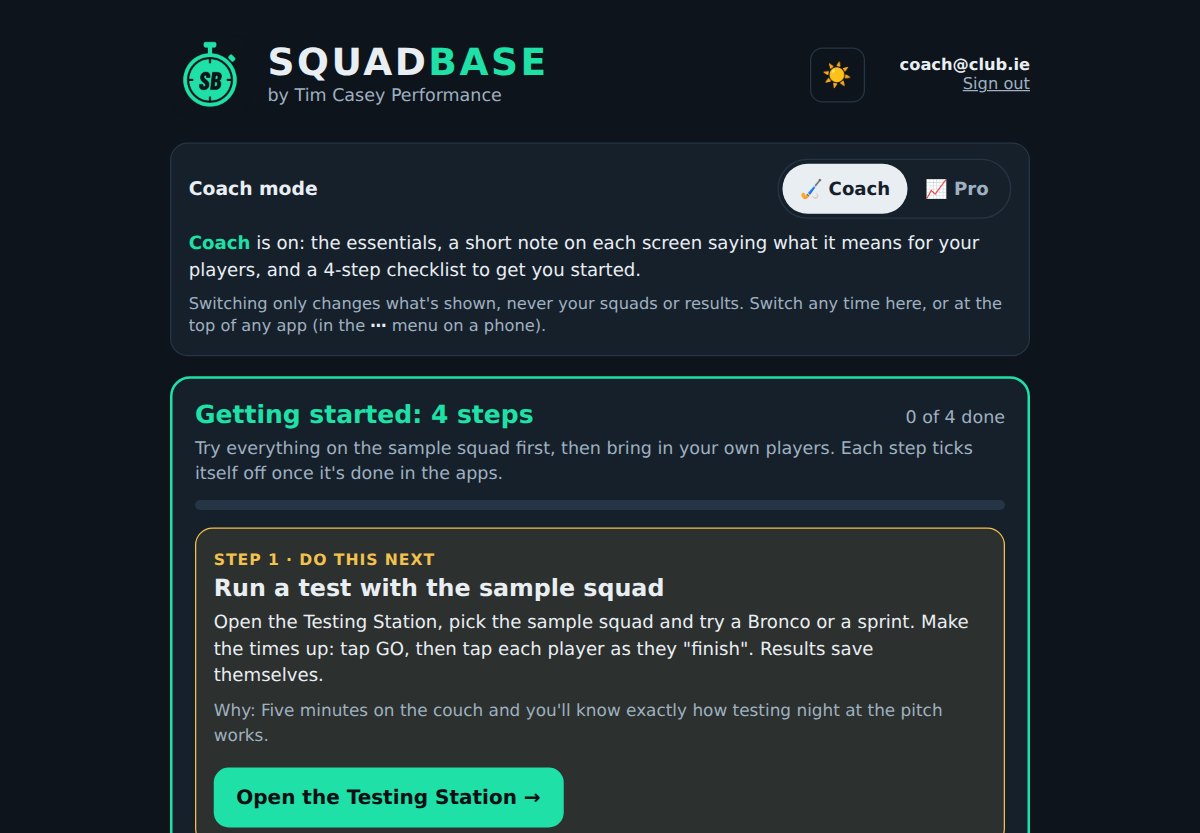
- Coach mode: Coach or Pro? The first time you open SquadBase it asks which sounds like you. Coach shows the essentials, a numbered Start here path on the home screen (watch the 80-second video, add your players, test them, see the results, plan their running and strength; each step ticks itself off once it's done) and a short note in each app on what it does for your players; the extra tabs wait behind More. Pro shows every test, setting and option, with the apps first and the Start here steps folded into one line. Switch any time under Coach mode on the home screen or at the top of any app: nothing you've entered changes.
- Dark or light? SquadBase is dark by default. On a bright day at the pitch, switch to Light: black text on white is far easier to read in the sun. Tap ☀️ at the top right of the home screen or any app (in an app on a phone it's in the ⋯ menu, which also has Match my phone to follow your phone's own dark-mode setting). Every app changes together.
- Have a look around. A Sample Squad (delete me) is added for you: 12 players and four testing days, so every chart and report has something in it. Open any app from the home screen and try it.
- Bring in your own players from a spreadsheet (section 3), or add them in Squad Dashboard.
- Run your first test with the Testing Station, then look at the results in Squad Dashboard.
When you're finished with the sample squad, delete it in Squad Dashboard.
2Which test should I use?
Two numbers drive the running: aerobic speed (MAS) and top speed (MSS).
| Test | Gives you | You need | Good for |
|---|---|---|---|
| Bronco (1200 m of shuttles: 20, 40 and 60 m out and back, five times) | MAS | Cones, the Run timer or a stopwatch, 60 m of grass | Most squads. Quick, everyone at once, on the pitch |
| Time trial (e.g. 1.2–2 km) | MAS | A measured loop and the Run timer (staggered starts) | Adult squads; straightforward and very repeatable |
| Beep test (run from the Testing Station) | MAS, plus the score itself | Cones 20 m apart and the phone's speaker | Big groups and indoor halls; the app plays the beeps and records each player as they drop out |
| 20 m fly (20 m build-up, then timed over 20 m) | MSS (top speed) | Timing gates if you have them; a stopwatch is less accurate | Speed sessions and short intervals |
- Pick one aerobic test and stick with it, so results compare from one testing day to the next.
- Retest every 6–8 weeks in pre-season, and two or three times across the season.
- No timing gates? That's fine: players without a top-speed test are set from MAS instead.
How to run the running tests
Cone layouts, step-by-step instructions and what the beeps mean. The same guides are in the Testing Station: tap How to run this test when you pick one of these tests.
Bronco (1200 m)
Equipment
- 4 cones per lane and a measuring wheel or tape measure.
- The Run timer in this app (or a stopwatch).
- A helper for each lane to count reps.
Setup
- Cones at 0, 20, 40 and 60 m in a straight line.
- One lane per group, lanes about 3 m apart.
- Flat grass, players in boots.
How it runs
- One rep: out to 20 m and back, out to 40 m and back, out to 60 m and back (240 m).
- Five reps with no rest = 1200 m.
- The clock stops when the player crosses the start line at the end of the 5th rep.
- Each lane's group starts together. In the Run timer choose All together, tap GO as they set off, then tap each player as they cross the line. Run the next group the same way: anyone with a time already is left off.
No-rep
- A foot must touch each line. Turning short of a line doesn't count.
Tips
- A 10-minute warm-up first.
- The lane helper calls out the rep number each time a player passes the start line.
- MAS is worked out from the time for you.
Time trial
Equipment
- Cones for the loop and a measuring wheel or tape measure.
- Numbered bibs if you have them.
- The Run timer in this app.
Setup
- Measure a loop, for example 400 m around the pitch. 1200 m = 3 laps, 1600 m = 4, 2000 m = 5, 2400 m = 6.
- Cones on the inside line so nobody cuts corners.
- Mark one clear start and finish line.
How it runs: staggered starts
- Players go one at a time, every 10–15 seconds, in the order you set.
- One clock runs the whole time. Each player's time is their finish minus their own start, and the app works it out. No maths on the day.
- Example: player 2 sets off at 0:15 on the clock and crosses the line at 7:45, so their time is 7:30.
Why stagger the starts
- Players can't sit on someone else's pace.
- Finishes are spread out, so they're easy to record.
Using the Run timer
- Put players in the order you want: drag them, or use the sort buttons.
- Tap GO when the next player sets off. A countdown shows when the next one is due, with a buzz (and a beep if you turn it on). Names are never called out.
- Tap a player's tile when they cross the line. Made a mistake? Tap Undo within 10 seconds, or fix the time afterwards.
Tips
- Bibs make finishers easy to spot.
- Have a helper at the finish whose only job is tapping finishers.
- Tell players how many laps before they start.
T-test (10 m / 5 m)
Setup: metres
- Cone A is the start and finish. Cone B is 10 m straight ahead of A.
- Cones C and D are 5 m either side of B.
- The original test is in yards (9.14 m and 4.57 m). Always use the same layout so results compare over time.
Equipment
- 4 cones and a measuring wheel or tape measure.
- Timing gates at A, or a stopwatch.
How it runs
- Sprint from A to B and touch B.
- Shuffle left to C and touch it.
- Shuffle right to D and touch it.
- Shuffle back to B and touch it.
- Backpedal through A.
No-rep
- Crossing feet, not facing forward the whole time, or missing a touch. Redo it after full rest.
Tips
- Two attempts with 2–3 minutes rest between them. The best one is kept.
Flying sprints (10, 20 or 30 m fly)
Equipment
- 4 cones and a measuring wheel or tape measure.
- Timing gates at B and C if you have them. If not, a stopwatch and someone standing level with C.
Setup
- Cone A is the start. Cone B is 20 m on: the run-in, where players build up to full speed.
- Cone C is 10, 20 or 30 m past B: the timed part. Use the same distance every time.
- Leave 20 m or more past C to slow down safely.
How it runs
- From A, build up smoothly (no flat-out start) so you are at full speed by B.
- Hold full speed all the way through C. Don't ease off before the line.
- Only B to C is timed. With a stopwatch, start as their chest passes B and stop as it passes C. Hand times on a fly are hard: gates are much better.
Fair testing
- 2 or 3 runs each, with 3 to 4 minutes of full rest between. The best time is kept.
- The same run-in, surface and timing every time, so results compare.
The result
- Top speed is the distance divided by the time. For example 30 m in 3.75 s is 8.0 m/s (28.8 km/h).
- It sets the top-speed work in the Running Builder. A 10 m and a 30 m fly read a little differently, so compare each player with their own last test on the same distance.
Tips
- A full warm-up with 3 or 4 build-up runs first. Flying sprints are fast: don't test tired or tight hamstrings.
- Not the day after a match or a hard session.
Sprints from a standing start (5, 10, 20, 30 m)
Equipment
- Cones and a measuring wheel or tape measure.
- Timing gates if you have them, or a stopwatch.
Setup
- A start line and a finish cone at the distance you are testing.
- With gates, the front foot starts 0.5 m behind the first gate.
- Grass in boots, or a hard surface in runners: the same each time.
How it runs
- A standing (two-point) start: one foot forward, no rocking back before going.
- Sprint flat out and run through the finish. Don't dip or ease off before the line.
- With a stopwatch, start on their first movement and stop as their chest crosses the line.
Fair testing
- 2 or 3 runs each, with 2 to 3 minutes of rest between. The best time is kept.
- Stopwatch times come out about 0.2 s quicker than gates. Compare each player with their own earlier times, timed the same way.
Tips
- A good warm-up with a few build-up runs first.
- Not the day after a match or a hard session.
Broad jump (standing long jump)
Equipment
- A tape measure laid on the ground from a start line. Grass or a mat, not a slippy floor.
How it runs
- Toes just behind the line, feet about shoulder-width apart.
- Swing the arms, bend, and jump forward as far as you can from both feet.
- Land on both feet and hold the landing. Falling back or taking a step means jump again.
- Measure from the line to the back of the heel nearest the line.
Fair testing
- 3 jumps each with 30 to 60 seconds between. The best counts.
- Same shoes and surface each time.
The result
- A distance in centimetres. Further is better: it shows leg power.
Standing triple jump
Equipment
- A long tape measure on the ground from a start line, on grass.
How it runs
- Start like a broad jump: toes behind the line, both feet.
- Three jumps in a row, both feet to both feet, with no pause between them.
- Hold the landing on the third. Measure from the line to the back of the nearest heel.
- Some coaches use a hop, step and jump instead. Either is fine: use the same one every time.
Fair testing
- 2 or 3 attempts with a minute or two between. The best counts.
The result
- A distance in centimetres. It shows leg power and how well a player links jumps together, like repeated strides.
Max pull-ups
Equipment
- A bar high enough to hang from with straight arms and feet off the ground.
How it runs
- Overhand grip, a little wider than the shoulders. Start from a dead hang: arms fully straight.
- Pull until the chin is over the bar, then lower all the way to straight arms. That is one.
- No swinging, kicking or kipping. Half reps don't count.
- The test ends when they stop, can't get the chin over, or rest more than 2 seconds at the bottom.
The result
- The number of full pull-ups. A player who can't do one scores 0: inverted rows and slow lowering from the top build them up.
Bar speed (trap bar or bench)
Equipment
- A bar-speed sensor and its app (a device on the bar or a cable that measures speed in m/s).
- The same device and setup every time.
Setup
- Pick one weight and use the same weight every time you test, for example a set percentage of their best or a set number of kg. Write it down.
- Warm up with a few lighter sets first.
How it runs
- 3 reps, each one lifted as fast as possible with good form.
- Record the best rep's speed in m/s (or the average of the 3: the same choice every time).
The result
- A higher speed at the same weight means the player is stronger and more powerful at that weight.
- Only compare tests done with the same weight and the same device.
Yo-Yo IR1 (live run)
Equipment
- 3 cones per lane and a measuring wheel or tape measure.
- This app on a phone or tablet, volume right up. A Bluetooth speaker helps with a big group or wind.
- Bibs or numbers, and a helper for every 6 to 8 players if you can.
Setup
- Mark a start line and a line 20 m away. Put a recovery cone 5 m behind the start line.
- Give each player about 2 m of width. Several players can share a lane.
- Flat grass, players in boots. Use the same surface each time so results compare.
The beeps: what each one means
- A voice says the test is starting in five seconds, then three short, low pips count down 3, 2, 1. Players stand on the start line.
- A long beep: go. Run out to the 20 m line.
- A short beep: you should be at the 20 m line. Turn and run back.
- Another short beep: you should be back over the start line. That is one shuttle (40 m).
- Then 10 seconds of quiet: jog to the recovery cone 5 m behind and back, and be on the start line for the next long beep.
- Two quick, higher beeps instead of one long one: the speed goes up (a new level). With Call out levels ticked, the voice also says the new level during the recovery before it.
How it runs
- It starts slowly at level 5 and gets faster each level. The first few levels are only one or two shuttles; from level 14 each level is eight shuttles.
- The screen shows the level and shuttle (for example 15.3), the distance so far, and what comes next.
- The phone stays awake during the test. If the beeps stop because the screen was locked, tap Tap to turn the beeps back on.
Warning, then out
- The first time a player is not back over the start line on the short beep, tap their tile: they get a warning and the tile turns gold.
- The second time, tap again: they are out. Their score is the last shuttle they finished.
- A player who stops by themselves: tap them out straight away.
- Turning short of the 20 m line counts as a miss too.
Big group? Use helpers
- Each helper opens the Testing Station on their own phone, picks the same squad and test, and taps Join run. Their phone follows the same beeps.
- Use My group so each helper only sees the players they are watching.
The result
- Each player gets their distance in metres and their level. Their MAS (running speed) is worked out for you and sets their running distances.
- For adult players, about 1,000 m or less is on the low side and over 1,700 m is very good. Younger players will be lower: compare each player with their own last test.
Tips
- A 10-minute warm-up first, with a few shuttles at the starting speed so they learn the beeps.
- Test the volume before you start: a player who can't hear the beep can't do their best.
- Not the day after a match or a hard session. Test at the same time of the season each year.
Beep test (live run)
Equipment
- Cones and a measuring wheel or tape measure.
- This app on a phone or tablet, volume right up. A Bluetooth speaker helps with a big group or wind.
- A helper for every 8 to 10 players if you can.
Setup
- Two lines exactly 20 m apart, marked with cones at each end.
- About 1 to 2 m of width per player, so nobody runs into anyone at the turn.
- A flat, dry surface, the same each time, so results compare.
The beeps: what each one means
- Three short, low pips count down 3, 2, 1, then a long beep: go. Run to the other line.
- Each beep after that: you should be on the line. Put a foot on or over it, turn and run back.
- Early? Wait on the line for the beep. Don't set off before it.
- Three quick, higher beeps: the speed goes up (a new level). With Call out levels ticked, the voice says the level too.
How it runs
- It never stops: there is no rest between shuttles. Each level lasts about a minute.
- Level 1 is a walk-jog (8 km/h). Level 2 is 9 km/h, then each level is half a km/h faster.
- The screen shows the level and shuttle (for example 9.4) and what comes next.
Warning, then out
- The first time a player is not on the line by the beep, tap their tile: they get a warning and the tile turns gold.
- The second time, tap again: they are out. Their score is the last shuttle they finished.
- A player who stops by themselves: tap them, then tap again a few seconds later.
- Turning short of the line counts as a miss.
Big group? Use helpers
- Each helper opens the Testing Station on their own phone, picks the same squad and test, and taps Join run. Their phone follows the same beeps.
- Use My group so each helper only sees the players they are watching.
The result
- Each player gets their total shuttles and level. Their MAS (running speed) is worked out for you and sets their running distances.
- Compare each player with their own last test first. The squad's standards show who is ahead and who needs work.
Tips
- A 10-minute warm-up first, with a couple of shuttles at the starting speed so they learn the beeps.
- Test the volume before you start.
- Not the day after a match or a hard session.
30-15 IFT (live run)
Equipment
- Cones and a measuring wheel or tape measure.
- This app on a phone or tablet, volume right up. A Bluetooth speaker helps with a big group or wind.
- A helper for every 6 to 8 players: watching the zones is the hard part.
Setup
- Three lines: A, B 20 m from A, and C 20 m further on (40 m end to end).
- Mark a 3 m zone at each line: a cone 3 m in from line A and from line C, and cones 1.5 m either side of line B.
- Flat grass, players in boots, the same surface each time.
The beeps: what each one means
- Three short, low pips count down 3, 2, 1, then a long, high beep: go.
- Each beep during the run: you should be in the zone at a line (A, B or C). At A and C, turn and run back; at B, run straight through.
- Two lower beeps: the 30 s run is over. Walk forward to the next line in front of you. That is where the next run starts.
- During the 15 s walk the voice says the next stage and speed. Then the 3, 2, 1 pips and the long beep again.
How it runs
- 30 s of running, then 15 s of walking, over and over. Each run is half a km/h faster than the last.
- Stage 1 is 8 km/h. Most club adults finish between 17 and 20 km/h.
- The screen shows the stage, the speed and the time left in the run or the walk.
Missed zones, then out
- Each time a player is not in the zone on the beep, tap their tile once. The tile shows how many in a row they have missed.
- 3 missed beeps in a row = out. If they get back into the zone on the next beep, the count clears.
- A player who stops by themselves: tap them on each of the next three beeps.
- Their score is the speed of the last stage they finished.
Big group? Use helpers
- Each helper opens the Testing Station on their own phone, picks the same squad and test, and taps Join run. Their phone follows the same beeps.
- Use My group so each helper only watches their own players.
The result
- Each player gets their 30-15 score in km/h. Their MAS is worked out from it (the score × 0.80) and sets their running distances.
- It is a harder test than the beep test: the turns and the stop-start running are closer to a match.
Tips
- A 10-minute warm-up first, with a stage or two at the starting speed so they learn the beeps and the walk.
- Brief the walk forward to the next line before you start: it is the part players get wrong.
- Not the day after a match or a hard session.
5-10-5 agility
Equipment
- 3 cones (or 3 lines) and a measuring wheel or tape measure.
- Timing gates on the middle line if you have them, or a stopwatch.
Setup: metres
- Three lines 5 m apart: the middle line is the start and finish, with a line 5 m to the left and 5 m to the right.
- Use metres every time. Results in the 20-yard version are about 0.3 s quicker, so never mix the two.
How it runs
- The player stands across the middle line, feet either side of it, in a two-point (standing) start.
- Sprint 5 m to one side and touch the line with a foot.
- Turn and sprint 10 m to the far line and touch it with a foot.
- Turn and sprint 5 m back through the middle line: the clock stops.
No-rep
- Missing a line, or a slow start (rocking back first). Redo it after a full rest.
Fair testing
- Two runs each with 2 to 3 minutes rest: one turning left first, one turning right first. The best time is kept.
- Stopwatch times come out about 0.2 s quicker than gates. Use the same timing each time.
Tips
- A good warm-up with a few build-up runs and turns first.
- Grass in boots, or an indoor floor in runners: the same each time.
3Bring in your data
Your players and old results from Google Sheets or Excel, in a few minutes.
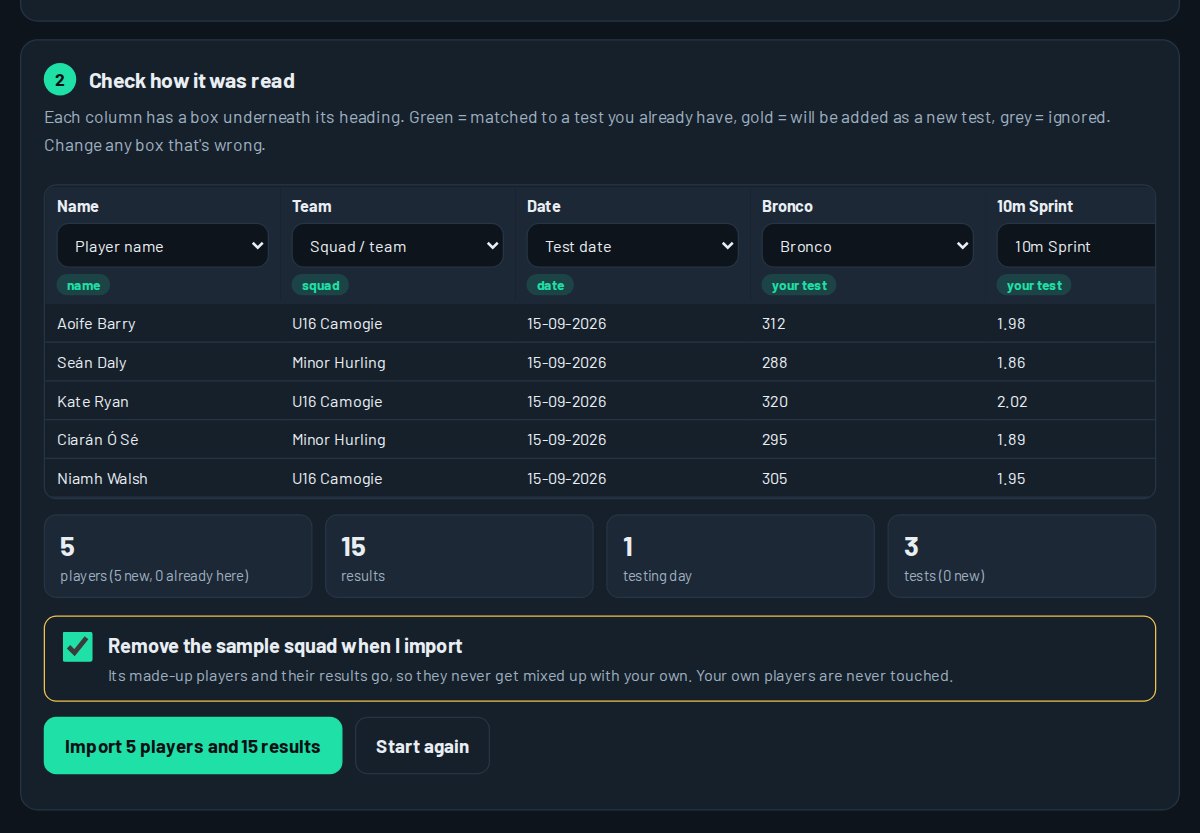
- From the home screen, tap ⬆ Bring in your existing data.
- Upload the file, or copy the cells in Google Sheets and paste them in.
- Check how it was read: each column is matched to a name, squad, date or test. Fix anything that's wrong before you import.
- Tap Import. Players already in SquadBase are matched, not added twice.
4Testing Station
Testing day on your phone, with helpers on theirs.
See it in 93 seconds.Watch Testing night: picking the test, the live beep test and Yo-Yo, the run timer, typing in results, and helpers testing on their own phones.
- Pick the squad and the test, then tap Start station.
- Tap a player and type their result. Mark anyone missing as Absent.
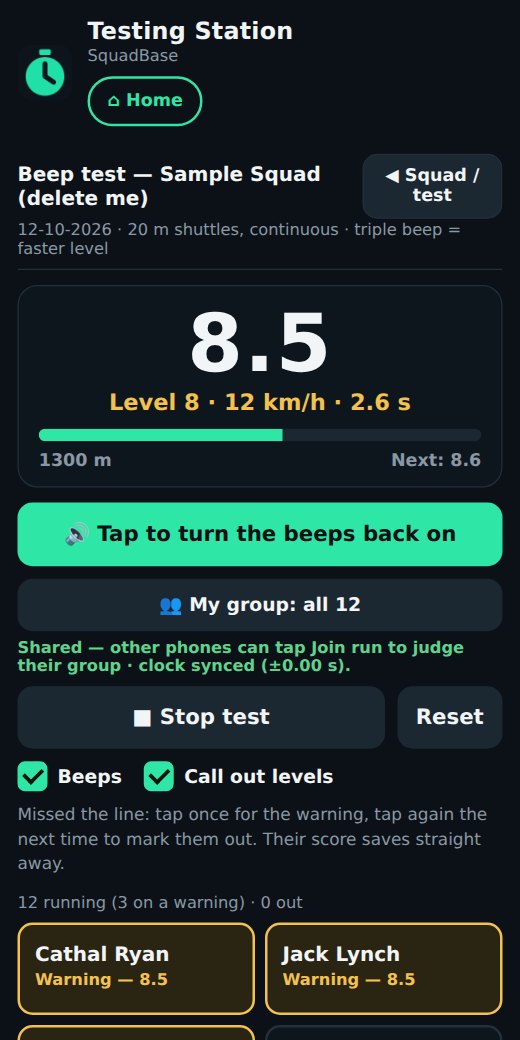
- For the beep test, tap ▶ Start test: the beeps play from the phone, and you tap each player out as they drop. Their score saves itself.
- For the Bronco or a time trial, type the time and the app works out MAS.
5Squad Dashboard
The whole squad on one screen.
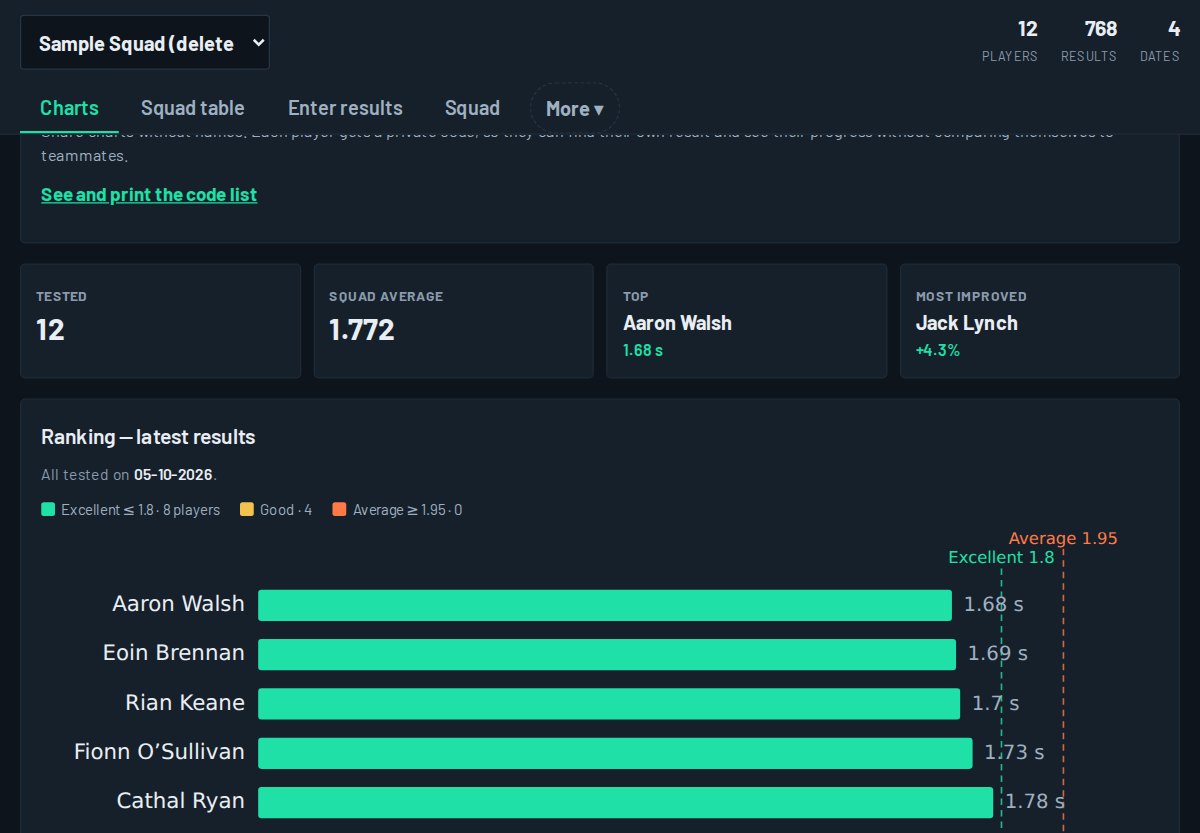
See it in 75 seconds.Watch Your results and reports: the rankings, the colours, Player Dashboard, the athlete report and who to share it with.
Tabs along the top:
- Charts and Squad table: pick a test and see everyone ranked, compared with last time and coloured against your standards.
- Enter results: type results in at a desk.
- Squad: add, edit or remove players and squads, and add your club crest.
- Locomotor profile (Pro): each player's running fitness (MAS), top speed (MSS) and the speed reserve between them, grouped as speed, hybrid or endurance types.
- Compare teams (Pro): your squads side by side for each test.
- Load (Pro, once you've sent player links): each player's training load for the week, worked out as how hard (0–10) × minutes from the sessions they tick, plus anything they log on their link with + Log a session (pitch training, a match, other gym work). Each player is compared with their own usual week (their last 4 weeks), never with team-mates: Higher than usual (a fifth or more) is worth a quick word, Much higher (half again or more) is worth easing the next session, and lower in a lighter week is planned. The arrows go back a week. The sample squad has made-up sessions so you can see how it reads.
- RAST (Pro): repeated-sprint results and fatigue.
- Standards: what counts as Excellent, Good or Average for U12–U14, U15–U16, minor (16–17) and adult squads. Use ours or set your own.
- Tests: add your own test (e.g. RSI or max pull-ups) with its unit, and whether higher or lower is better.
- Cloud & data: sync, import and export.
6Player Dashboard
One player's story, in one tap.
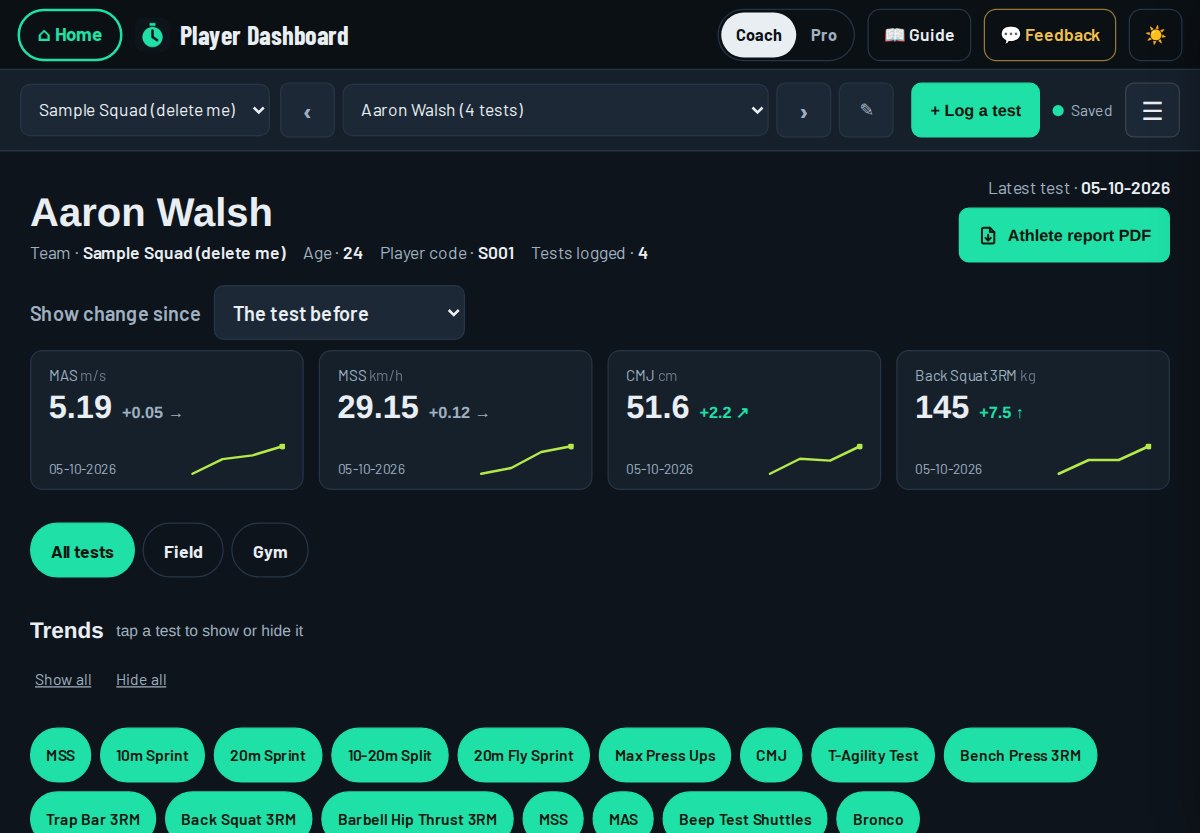
- Choose a player; step through the squad with the arrows.
- The tiles at the top show their key tests, with the change since last time: ↑ Better, ↗ Slight gain, → About the same, ↘ Slight drop or ↓ Down.
- Trend charts show every test over time, with the squad average alongside.
- Athlete report PDF makes a clean report to give the player or a parent.
- Training load (Pro, for players with a link): their last 12 weeks of load as bars, this week against their usual week, and their recent sessions with effort and minutes.
↑ Better: real progress. ↗ Slight gain: moving the right way, but not yet bigger than the wobble; keep going and retest. → About the same: holding steady, and that's fine. ↘ Slight drop: a small dip, usually nothing. ↓ Down: check the conditions first (wet ground, tired legs, a different start) before worrying.
Speed changes are tiny (a few hundredths of a second), so over 6–8 weeks a good sprint gain often shows as Slight gain. To see the bigger picture, open Squad Dashboard → Charts → Change since and use Compare from to pick an earlier test date, such as the start of the season. In Player Dashboard, Show change since at the top does the same for one player's tiles and table. Reports only praise real gains, so players can trust them.
7OffFeet Conditioning
Fitness without the pounding: rower, bike erg / Wattbike and assault bike.
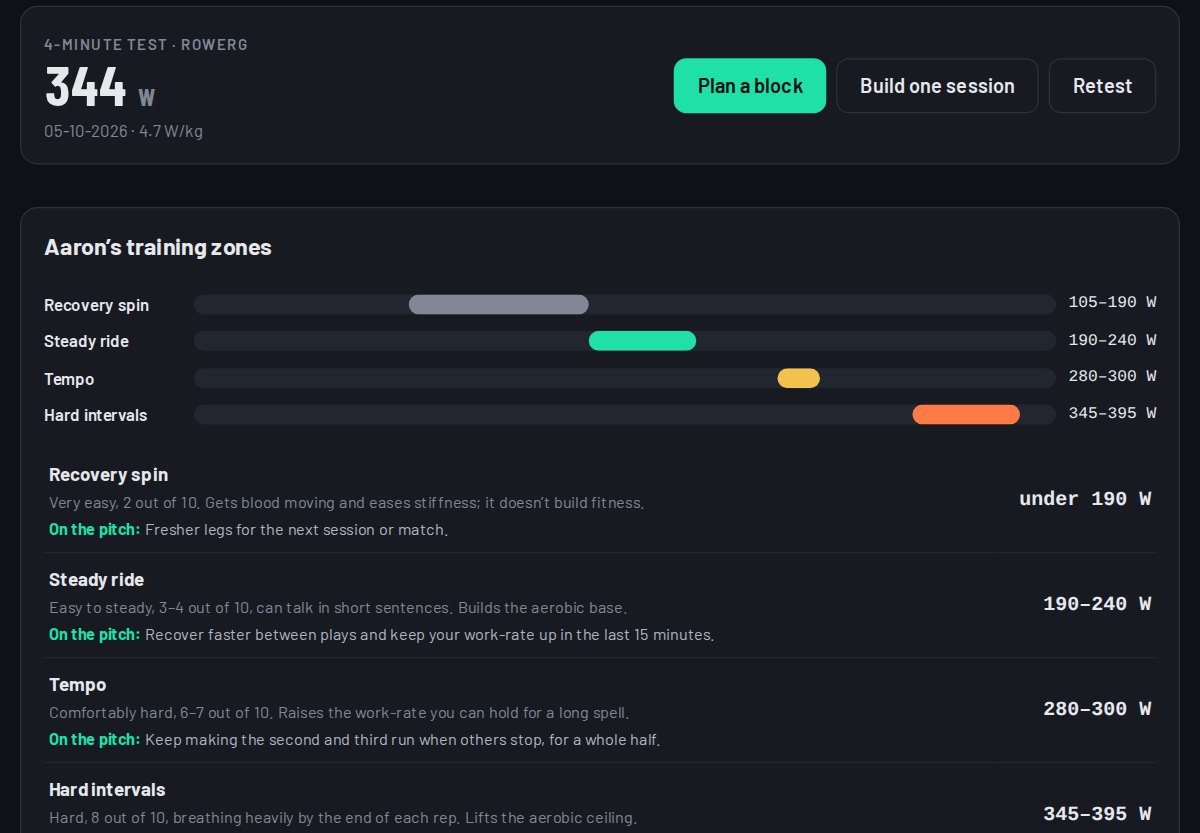
- Add players, then add their machine tests (peak power, 30 s, MAP, critical power and time trials). Each test unlocks more of their profile.
- Their profile shows strengths and weaknesses in plain English, and their own training zones in watts.
- Use New session or New running block to build training from those zones, and PDF to share it.
8Strength Builder
A whole squad's gym block, in one pass. In Pro mode only: it's built for qualified S&C coaches.
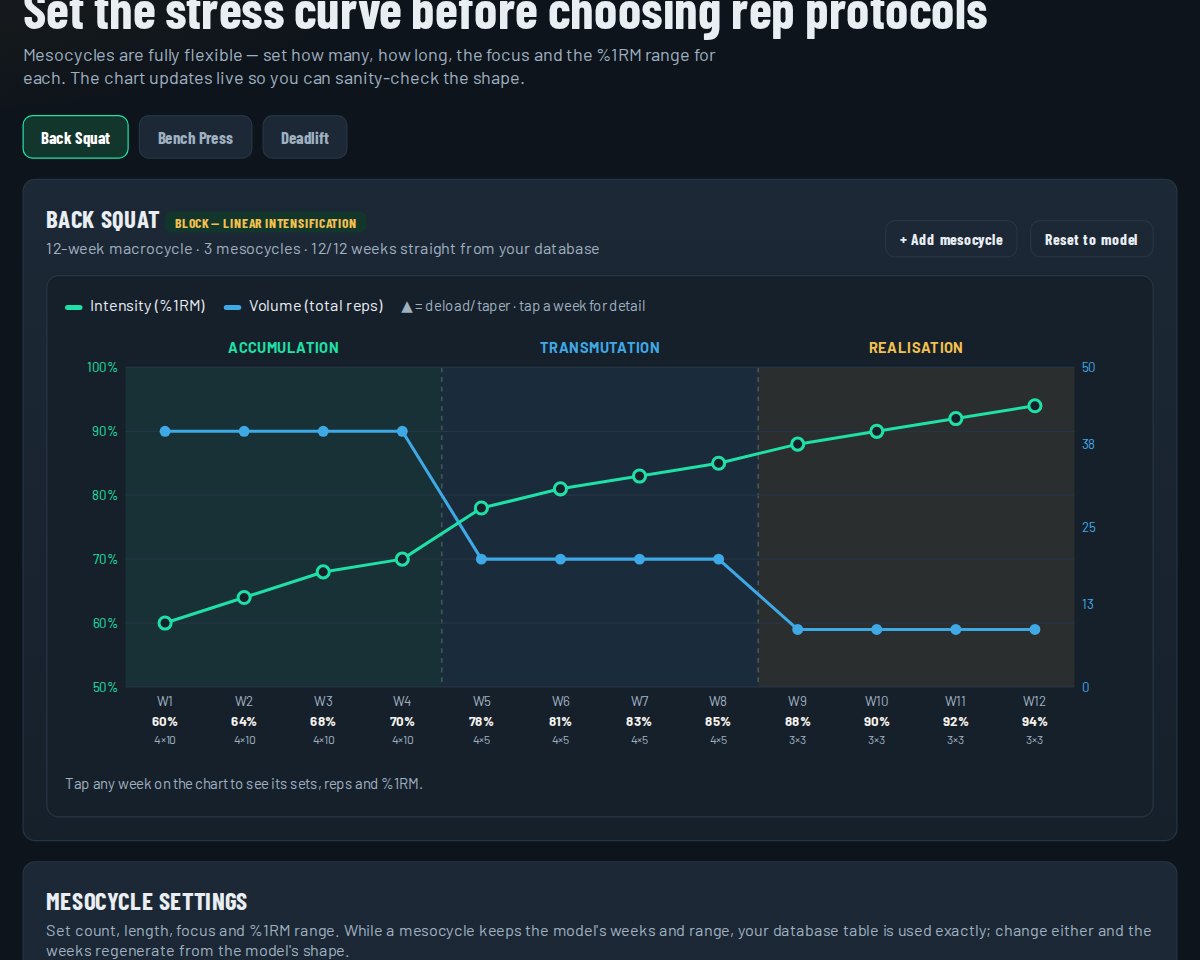
- Pick the squad and two to four main lifts (players need a tested 3RM for each).
- Choose a model for each lift, such as linear, block or undulating. 📖 Model guide explains each one.
- Set your mesocycles and check the shape of intensity and volume on the chart.
- Accept, move or skip the suggested deload weeks.
- Generate squad program: every player gets their own weights, rounded to usable plate jumps.
Age limits: every built-in week leaves about 2 reps in reserve, and younger players get lighter weeks. Starting numbers: U12–U14 up to 70% with sets of 8+, U15–U16 up to 80% with sets of 5+, Minor 16–17 up to 85% with sets of 3+, Adult up to 93%. Change any of them under Age limits on the Roster step, or switch them off for a squad: your call as the coach.
Accessories (step 5, optional): add the extra exercises for each training day, done after the main lifts. Pick from your exercise library (60 to start with, in groups such as Legs or Groin) or make your own. Set the sets, reps or seconds, rest, load and reps left, add a coaching note, and paste a demo video link: YouTube, Instagram, Vimeo or your own. Turn on Changes from week to week to build up through the block; deload weeks take a set off by themselves. Tap ✕ to remove an exercise (Undo is in the message). Under-16s are kept to bodyweight or a light weight.
Save PDF — squad sheet for the gym wall, or Save PDF — a page per player. Each player's page lists their accessories under the main lifts. Every video has a link to tap when the PDF is on their phone, and a QR code to scan when it's printed.
Send to players: on the last step, Send to players gives each player their own private link (for under-16s, send it to a parent or guardian). It opens their programme on their phone: each week and day with their own weights, the extra exercises and your videos. They can add it to their home screen as My training, and it works with poor signal in the gym. In the gym they tap an exercise and log each set's weight as they go; after the session they tap Mark as done and say how hard it was (0–10) and how long it took. + Log a session at the top of their page adds pitch training, a match or other gym work the same way, so their load covers the whole week. You see who has done what under Send to players, and your changes to the block reach their link by themselves. Stop turns a link off at any time.
9Running Builder
From the test results to the cones: every rep set to each player.
New to MAS and running groups?Read From test to running first: why you test, what MAS means, how the runs and groups are set. Six short steps, about 5 minutes.
See it in 72 seconds.Watch Planning the running: a new block, your fixtures, the groups and cones on your pitch, sending the card to the squad, and re-planning after a retest.
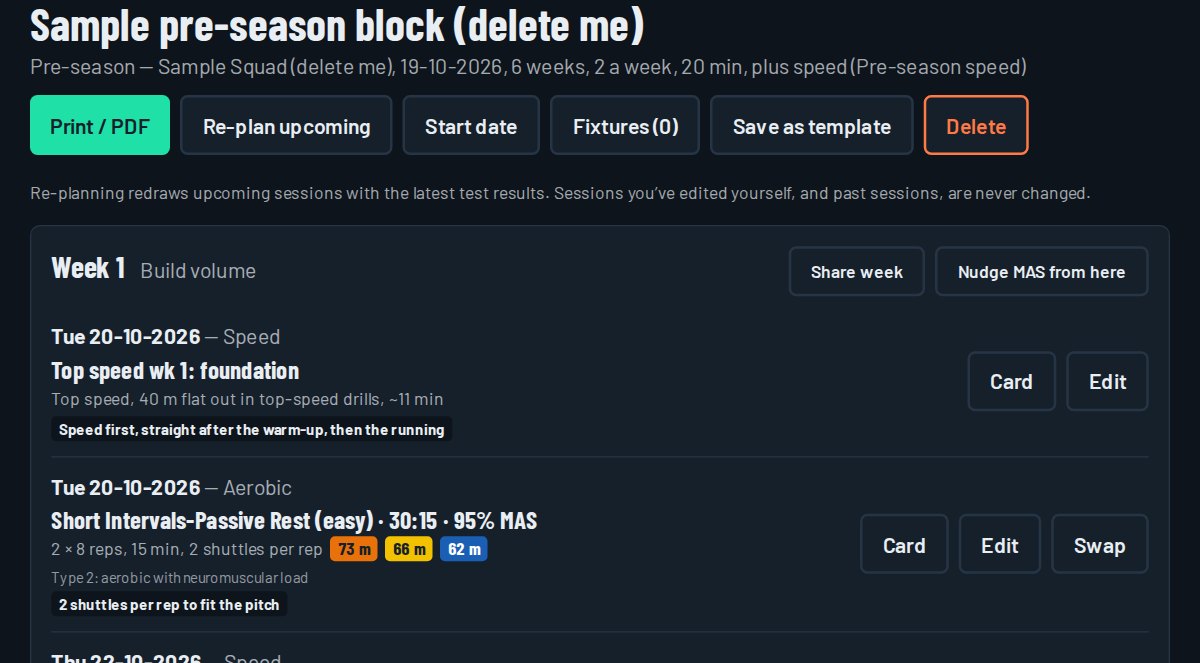
The first time you open it
Your squads, players and their aerobic and speed test results come across from Squad Dashboard by themselves, and a sample block is planned for the sample squad so you can see a finished plan. If you test again later, use Settings → Import → Check for new results to bring the new results in.
Plan a running block
- Tap Plan, then New running block.
- Pick the squad, the type of block (pre-season, in-season, speed, an individual player or return to play), the start date, your training nights and how many minutes you have.
- Add your fixtures: the hard running moves away from match days.
- Every session for the block is drafted, with the players split into groups by fitness and each group's distance worked out.
Set up on your pitch in minutes
This is what saves you time on a training night. Every session card is drawn on your own pitch (GAA, soccer or rugby, set by the squad's sport), and every cone is placed off a line that's already painted: the 13, 20, 45, 65 or halfway. A card reads like "Cone 1 m short of the 20 line at the far end", so there's no measuring tape and no maths at the side of the pitch.
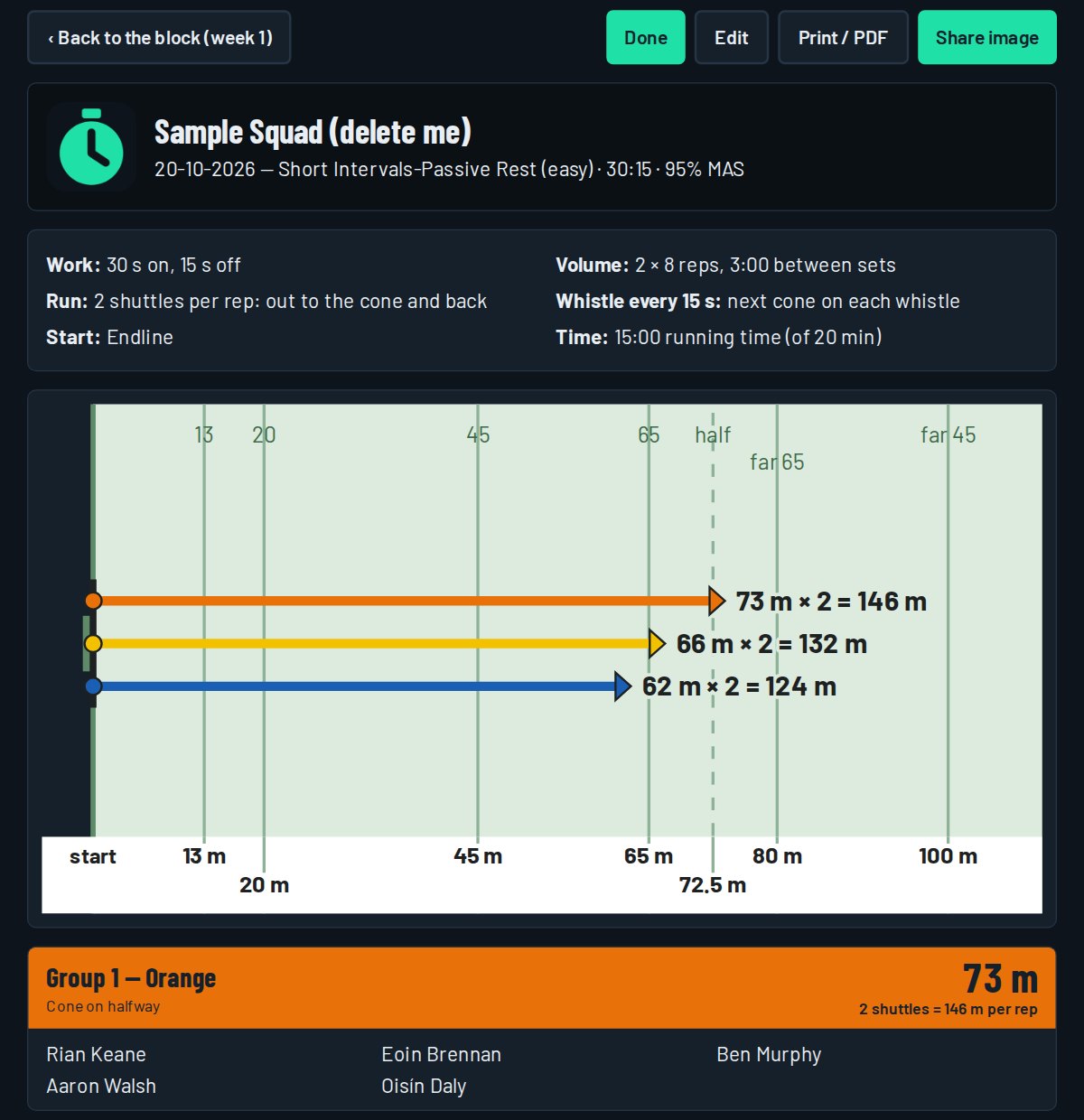
- Add your pitch once in Settings → Pitches: the length and width, and the lines if they're not standard. Add the back pitch or the astro too (an astro has no lines, so pick full, ¾, ½ and so on on the night and cones are measured from your end).
- Give each squad its home pitch and its usual minutes for running (Squads → edit). You can change the pitch or the minutes on the night.
- Put the cones out: one colour per group, at the spot on the card. Each group knows its colour, so players find their own cone.
- Run it: the session fits the minutes you gave it, so it slots in around the hurling or football.
Sessions
- Calendar shows the week. Tap + on a day for a quick one-off session for a squad or one player.
- Open a session to see the groups, distances and the cones on your pitch. Print / PDF or Share image to send it to the players or other coaches.
- Shuttles: long runs that don't fit the pitch can be split into shuttles. The turns are already allowed for, and the card tells you how often to blow the whistle (every 40 seconds, say) so players know when they should reach each cone.
- Tap Done after the session and confirm who was there, so the training load counts.
Conditioning games, then a top-up
Players love games, but in a conditioning game the fitter players can coast and the work depends on where the ball goes. Grouped runs leave nowhere to hide. So a game never replaces the runs one for one. A night of conditioning games is:
- Warm-up.
- Flat-out runs (2–3 short sprints), only in weeks with no speed session and never the night before a match. Small games rarely let players open up.
- The game, picked to do the same job as the runs that night: the size, numbers, bouts and rest, with rules that keep everyone working. Teams are balanced on each player's MAS.
- A short top-up in each player's MAS group, so every player gets the work.
- Set it up when you plan the block: under How do you want to run your conditioning? pick Conditioning games + top-up and tick the nights you want them. For U12–U14 squads, conditioning games lead on most nights.
- Or change one session: open it and tap Switch to conditioning games, or Back to runs only. The planned runs are kept, so you can switch back any time.
- On the night, tap Who's here and untick anyone missing: the game, the teams and the top-up groups are made again for the players who came. If too few turn up for a proper game, the card suggests switching to runs. It's your call.
- The pitch drawing shows the games to scale on your own pitch, with the cone spots in words off the painted lines. Drag a game to move it, tap one and Turn it, or pick Near half or Far half when the other half is in use.
- Change the game if you want a different type, more or fewer bouts, or other times. New teams gives a fresh, still fair, draw.
Speed
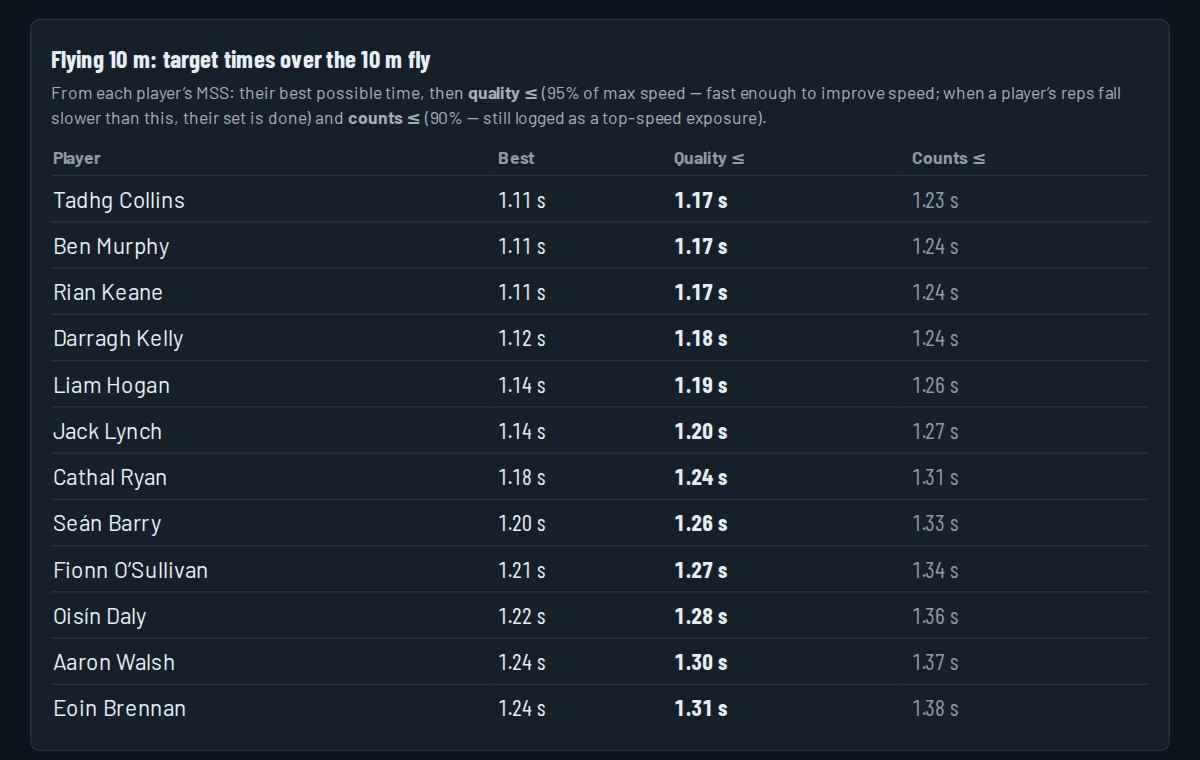
Speed sessions come from the built-in speed programmes (pre-season and in-season). Speed always goes first, straight after the warm-up. Flying sprints show each player's target time from their top speed.
Players who missed testing
A player with no fitness test can't be put in a running group, so a gold note shows on the squad page, the block, the new block form and the session card. Tap Pick a teammate for each to run with and choose someone of similar speed and fitness. He takes that teammate's numbers, runs in the same group at the same cone, and the upcoming sessions are re-planned with him in them.
- You only do it once per player. It shows in gold as Coach's estimate (runs with …) on cards and the player list, never as a test result. It's left off the squad chart and isn't sent to Squad Dashboard.
- When he's tested, the real result takes over by itself. After 6 weeks on an estimate, the note reminds you to test him.
- A session already made without him: open it and tap Add him to tonight's runs.
Nudge MAS
If it's been 5–6 weeks or more since a player's last test and they're still making their cones too easily over several sessions, Nudge MAS adds a little to their MAS (0.25 km/h by default) so their distances get longer. Players often make the cones easily early in a block just by pacing well, so that alone isn't a reason to nudge. Tick only the players who have been training regularly. A nudge is an estimate: it never changes the test results in Squad Dashboard or Player Dashboard, and the next real test replaces it.
10Reports and PDFs
Every app turns your results into a clean PDF in one tap.
- For players: the athlete report (Player Dashboard), off-feet results with their zones (OffFeet), and their own gym programme (Strength).
- For the squad: squad comparison and beep-test norms (Squad Dashboard), the squad strength sheet, and running session cards.
- For management: ratings against age standards and change over the season, with your club crest.
GGame Builder
Size your conditioning games and pick fair teams, with the cone spots on your own pitch. Works in Coach and Pro.
- Pick the sport, the age group and what the game is for: tight and sharp, repeat efforts, open and fast, or like a match. Enter how many players you have and how many days to the next match.
- You get the best set-up (for example two games of 6 v 6), the size of each area, a session card with bouts and rest you can change, rule tweaks, and a to-scale pitch you can drag the games around on. Save the pitch size once and it's remembered.
- Pick teams from my squad brings in your SquadBase squads. Each player's level (Developing, Solid, Strong) is set from their own MAS in the Testing Station, so the teams are fair on fitness, not on guesswork. Tap a level to change it, add positions, and keep pairs apart or together. Update from SquadBase refreshes the levels after a testing night. Your own changes (positions, pairs) are kept.
- Share: Copy for WhatsApp, Save as image, or Print. Under-16 squads show as first name and initial; levels never appear on anything you share.
SportSport and men's or women's
Every squad also has a sport (Hurling, Football, Camogie, Ladies football, Soccer, Rugby or Other) and is a men's, women's or mixed squad. Set them when you make or import a squad, or on the Home screen card, and change them on the Squad Dashboard → Squad tab.
- Running Builder: a soccer or rugby squad gets a standard soccer or rugby pitch, and cones are placed off that pitch's own lines.
- Game Builder opens on the squad's sport, and Strength Builder picks it up when you choose the squad.
- Women's squads: women's standards are not built yet, so for now ratings compare your players with men's club numbers. The screens and reports say so. Use them to track each player's own progress.
- A squad made before this was added is treated as GAA until you set it.
U16Under-16 squads
Every squad has an age group: U12–U14, U15–U16, Minor (16–17) or Adult. Set it when you make or import a squad (Squad Dashboard → Squad tab). A player's own year of birth, if you enter it, decides their age group instead. It's optional: you never need it to add a player.
- Standards: U12–U14 squads are rated against the youth standards, U15–U16 and Minor against the older-youth standards.
- On screen you see everything, rankings included, at every age.
- What you share is different. PDFs, charts and player reports of U12–U14 and U15–U16 players show player codes and leave out rankings and comparisons with team-mates: Squad Dashboard charts list the players A to Z, each one against the age standard (Excellent, Good, Average) and their own last result. To include them, tick Include rankings and comparisons (it's unticked every time) and confirm you're sharing in line with your club's safeguarding policy. Player reports say "For the player and their parent or guardian only."
- No notes boxes for under-16 players (no health or injury notes), and no return-to-play blocks: use an Individual block if a player needs their own running.
- Tests and running suit the age: U12–U14 squads get sprints, the CMJ, the beep test, the Yo-Yo IR1 and the T-test; U15–U16 every field test but no gym 3RMs. Running is capped at 15 minutes (U12–U14) and 20 minutes (U15–U16), with the juvenile speed programmes.
- Names: full names by default. On the Squad tab you can switch a squad to first name and initial, or player codes only. That changes the stored names everywhere and can't be undone, so the app asks first.
- Helpers must be 18 or over. Never add a player as a helper.
11Your data, helpers and help
- Your data is yours. Each coach sees only their own squads. SquadBase stores the year of birth only, and only if you give it, never a full date of birth.
- Export or delete everything from the home screen under Your data.
- Helpers (other coaches or parents helping on testing day) can be added by email. They see names only and record results in the Testing Station; you see who entered what.
- Need a hand? Email [email protected]. A screenshot of the problem helps.
See also the Privacy Policy and Terms.